DLP Selection Process: Protection Requirements
Now that you’ve figured out what information you want to protect, it’s time to figure out how to protect it. In this step we’ll figure out your high-level monitoring and enforcement requirements.
Determine Monitoring/Alerting Requirements
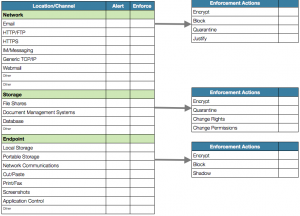
Start by figuring out where you want to monitor your information: which network channels, storage platforms, and endpoint functions. Your high-level options are:
Network
Email
Webmail
HTTP/FTP
HTTPS
IM/Messaging
Generic TCP/IP
Storage
File Shares
Document Management Systems
Databases
Endpoint
Local Storage
Portable Storage
Network Communications
Cut/Paste
Print/Fax
Screenshots
Application Control
You might have some additional requirements, but these are the most common ones we encounter.
Determine Enforcement Requirements
As we’ve discussed in other posts, most DLP tools include various enforcement actions, which tend to vary by channel/platform. The most basic enforcement option is “Block” – the activity is stopped when a policy violation is detected. For example, an email will be filtered, a file not transferred to a USB drive, or an HTTP URL will fail. But most products also include other options, such as:
Encrypt: Encrypt the file or email before allowing it to be sent/stored.
Quarantine: Move the email or file into a quarantine queue for approval.
Shadow: Allow a file to be moved to USB storage, but send a protected copy to the DLP server for later analysis.
Justify: Warn the user that this action may violate policy, and require them to enter a business justification to store with the incident alert on the DLP server.
Change rights: Add or change Digital Rights Management on the file.
Change permissions: Alter the file permissions.
Map Content Analysis Techniques to Monitoring/Protection Requirements
DLP products vary in which policies they can enforce on which locations, channels, and platforms. Most often we see limitations on the types or size of policies that can be enforced on an endpoint, which change based as the endpoint moves off or onto the corporate network, because some require communication with the central DLP server.
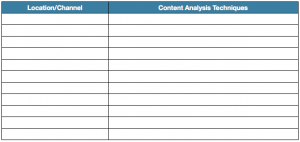
For the final step in this part of the process, list your content analysis requirements for each monitoring/protection requirement you just defined. These tables directly translate to the RFP requirements that are at the core of most DLP projects: what you want to protect, where you need to protect it, and how.